
photo blog  photo tinker.jpg  photo connect.jpg  photo present.jpg

Monday, August 10, 2015

#MakerMonday

As part of my blog makeover, I came up with a few "themed" posts that I could do throughout the year.. so here is the first #MakerMonday!


I taught summer school this year, and this time invented my own classes to teach. I came up with an idea for a GEMS (Girls in Engineering, Math & Science) class, inspired by so many wonderful people and ideas, including Lindsey Petlak's STEMagination Station, Super Awesome Sylvia, Made with Code, GoldieBlox, and many more! I had two classes of wonderful girls, separated in grades K-1 and 2-3.  

If I could teach GEMS everyday of the rest of my life, I would absolutely, 100% do it! I had the BEST time! Each week brought something new, from using literature as inspiration for activities (like the Wizard of Oz, Mo Willem's Pigeon books, If I Ran the Zoo by Dr. Seuss, Harry Potter), to sew electric projects, Squishy Circuits, building with Goldie Blox, coding and programming robots, and more.  It is impossible to choose a favorite activity that we did, but just watching the building unfold out each day of simple items and a little bit of imagination was magical. These are a couple of our Animal Catching Machines from If I Ran the Zoo by Dr. Seuss:


They look simple, but the engineering, creativity, thought, and imagination put into them by kindergarteners melted my heart each day. 

Check out the <Tinker> section for some photos of the GEMS awesomeness! 

Sunday, August 2, 2015

August Currently

I'm linking up with Farley and her August Currently!


Listening to my new yoga playlist for each week. I started teaching yoga in June as something "on the side" and have loved it! I make new playlists each week and have enjoyed finding new music on Spotify. (which, by the way, is the BEST app for music ever. Totally worth the $9.99 per month!)

Loving the new Zac Brown Band album Jekyll + Hyde. We are going to see ZBB in September at Wrigley Field, and I cannot wait! His new album is fantastic, and totally fits the name "Jekyll + Hyde". Seriously, one moment I'm listening to something that sounds like its out of the 1940s, and the next its similar to heavy metal. Love love love!

Thinking about all the things I have to pack and do tomorrow to get ready for our trip to Vermont & Boston! We leave on Tuesday, and have so much to do before then. Lists on lists on lists!

Wanting another month of summer. For real, how is it August already?!

Needing an ice cold LaCroix. Because it has been 90s in Chicago all week. 

B2S RAK I know, I had to look up what an RAK was too. {Random Acts of Kindness}. I had lunch with some of my best teacher friends the other day, and joked that I would be the one spreading sunshine and rainbows this school year. It is one of my goals to spread joy and be as positive as I can at work. I want to uplift and inspire my colleagues this year! Negativity can be such a trap, but it is my mission to remain positive - so kicking the year off with some Happy Mail for coworkers is a good place to start :-)

Tuesday, July 28, 2015

Learning Commons Construction Update

Our Learning Commons construction started the day after school got out, and is scheduled to be completed in just a few short weeks! It looks {AMAZING} so far and will be such an innovative & inspiring place to teach in!

<< DEMOLITION >>


<< FRAMING >>


<< DRYWALL >>

<< Our New Office >>

When everything is completed I'll post before and after pics! 

Blog Overhaul!

Hey everyone! I'm back... and I can't believe it has been since March since I last posted! #badblogger

I reflected about the reasons I stopped blogging back in March... 1) I was swamped at school and so busy teaching and learning that blogging got put on the back burner & 2) I realized that my blog was too narrow for who I am. Yes, I will continue to post tech tips, but there is so much more to technology integration than that.. and me!

So, I sat down yesterday and started hashing out a plan. The first thing I did, was make a big change by deleting the name "iWonder" and changing it to "iTeacher Lauren". This has been my Twitter handle for several years, and it was always the address this blog was at via Blogspot. I think it will open new windows of opportunity for me to post about much more than just tech tips! So the first thing I changed was the header and then....

<< I BOUGHT MY OWN DOMAIN!! >>

Yes, I now own iTeacherLauren.com!! So, make sure you bookmark it :-) 

Next, I realized my content tabs were irrelevant, so I decided to just do a complete design makeover. With our Learning Commons being built this summer, I want to post and share my experience teaching in a new, innovative space. I want to connect and collaborate with other educators about what they are doing in their MakerSpaces and how we can imagine new possibilities for our students. And overall, I just hope to inspire other educators! 

Now, let me tell you something. Until yesterday, I literally knew nothing about html code or using PhotoShop. But, I was determined to get this up and running before the craziness of the start of the school year, so I dug my heels in and got to work. I watched several tutorials on YouTube, got frustrated, and persevered to make it all happen. Yes, this was {yesterday} and today it is all up and running! Thanks to Ashley at Schroeder Shenanigans for inspiring me to SINGLE TASK!

In a nutshell, that's my short story of why I was determined to make a change, and I am {oh.so.happy} with the result. I hope you are too, and I am so excited to continue this journey!

Cheers to a fresh start and new beginnings!

Sunday, March 22, 2015

Icon-apalooza

Last week I saw a post on A Trendy Teacher's blog that made me {oh-so-happy}!! So today I am doing some Spring Cleaning on my desktop and getting digitally organized!

I always used the colored labels for my Mac folders... and then they just turned into a dot. Boring! But now, my desktop folders can go from this:


to this!!!

Yes, you too can organize your desktop with any icon you want... And it is SO EASY!!

I started the same way that A Trendy Teacher did, with a blank slide in Keynote. I inserted a circle shape and then just put a text box over it with the name of the folder. 


Then, select both items that you want (so they are grouped together). You can do this by clicking and dragging to select everything, or by holding the Command key as you select each item. Press command-c to copy the images. 


Next, click on the folder you want to change the icon of. Click on Command-I to get Info on the folder, or control-click and select Get Info. 


Next, click on the folder icon:


And then click on command-v to paste! 


Congrats, you now have the prettiest icons in all the land! 

If you don't want to make personalized icons, you can use ANY IMAGE you want. Find the images you want from Google (or any clipart), and put them into a Keynote or document. 
Copy/Paste the same way above under "Get Info", and BAM! Personalized folders in just a few moments!


Have fun!

Friday, March 6, 2015

AirDrop Awesomeness

All my hopes and dreams came true when I updated to Yosemite... or at least one of them.

Yes, in Yosemite, you can now AirDrop between your MacBook and an iOS device! I've already used it twice this week to get pictures from my phone to my laptop wirelessly! Brilliant! 

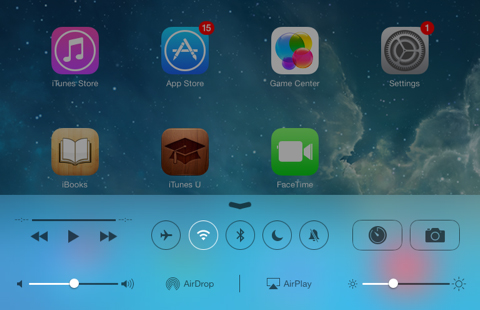
To use AirDrop on an iPhone or iPad, swipe up from the bottom to get the Control Center:


Click on AirDrop, and then Everyone (I had to do everyone to see my laptop as an option)

Then, on your laptop, go to AirDrop from Finder:


Since I've been using this to share Photos, I've been going into my Photo Album, selecting the photo I want, and then click the share button:


Once AirDrop comes up, I just click on where I want it shared to in AirDrop, and it shows up on my laptop in the downloads folder! 

You can also share the opposite way, from your Mac to iPad/iPhone. Also, you can AirDrop more than just photos - Keynotes, videos, webpages.. the list goes on!

For more info, check out  Apple's support page.

Or, check out this video tutorial.


Thursday, February 19, 2015

Blog Lovin'

As a blogger, I feel a little behind the times.. I just learned about & started using BlogLovin'! (And thanks to Teresa for sharing in my joy of this fabulous site!)


I follow lots of blogs.. if you want proof, my bookmarks bar is FULL of them! However, I don't always find the time to click on every. single. link. to see what the latest and greatest is. Enter - BlogLovin!

When you sign up for BlogLovin' (just with an email and password), you can choose some blogs to follow, either by searching or browsing what's recommended. You can type in search terms like, "education", "4th grade", "common core", etc. It will show you the search results, how many followers they have, and images from their latest posts. Just click the Follow button, and they will be added to your feed. If you are going to use BlogLovin' for more than just Education blogs, you can also sort the blogs into categories and group them together by topic. 

The best part about BlogLovin'? I don't even have to check it! Each morning, I get an email digest in my inbox if there have been any new updates or posts on the blogs I follow. If something interests me, I'll check it out, if not, delete! It has made life SO much easier, and I am getting some great ideas too!

So now that you're all ready to sign up - click on the Follow Me on BlogLovin' button to the right --->

And here's a tutorial I found to help get you started!