NPR had an article recently of how Class Dojo can tie in with Growth Mindset - they've created a series of videos to help kids understand the topic. A little cheesy, but cute!
As we use Google Apps for Education more and more in our day, there is always something new to learn! (growth mindset ;-) These tutorial videos range from 1-5 minutes on a variety of topics, from searching in Google, to YouTube and Google Drive.
Last week at the NICE Share-O-Rama, I learned about a Chrome Extension called Google Tone. This one is a life changer my friends!!
As a tech teacher, I often have limited time with students, and need to get them links and resources quickly. Especially for my younger kiddos, typing in a URL can take several minutes. Enter Google Tone!!
So here's how it works in my tech lab:
1) I installed Google Tone on Chrome on my laptop and on Chrome on all the laptops in my lab. {I made sure there was no one signed into Chrome when I installed on the laptops.}
2) I go to a URL on my computer I want the students to get.
3) Press the Google Tone icon.
4) Students get a popup message that looks like this:
5) Students click on the message and are taken to the website.
BOOM! Done!!
I just tried it with a class of first graders and it was <<SO fast and easy>>. And when things are easy, its a beautiful feeling :-)
All my hopes and dreams came true when I updated to Yosemite... or at least one of them.
Yes, in Yosemite, you can now AirDrop between your MacBook and an iOS device! I've already used it twice this week to get pictures from my phone to my laptop wirelessly! Brilliant!
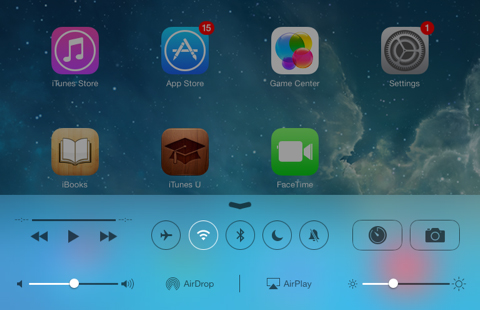
To use AirDrop on an iPhone or iPad, swipe up from the bottom to get the Control Center:
Click on AirDrop, and then Everyone (I had to do everyone to see my laptop as an option)
Then, on your laptop, go to AirDrop from Finder:
Since I've been using this to share Photos, I've been going into my Photo Album, selecting the photo I want, and then click the share button:
Once AirDrop comes up, I just click on where I want it shared to in AirDrop, and it shows up on my laptop in the downloads folder!
You can also share the opposite way, from your Mac to iPad/iPhone. Also, you can AirDrop more than just photos - Keynotes, videos, webpages.. the list goes on!